Work - Router Scan V2 60 Thmyl
The AI-powered command bar that puts clipboard, media, meetings, and more at your fingertips.
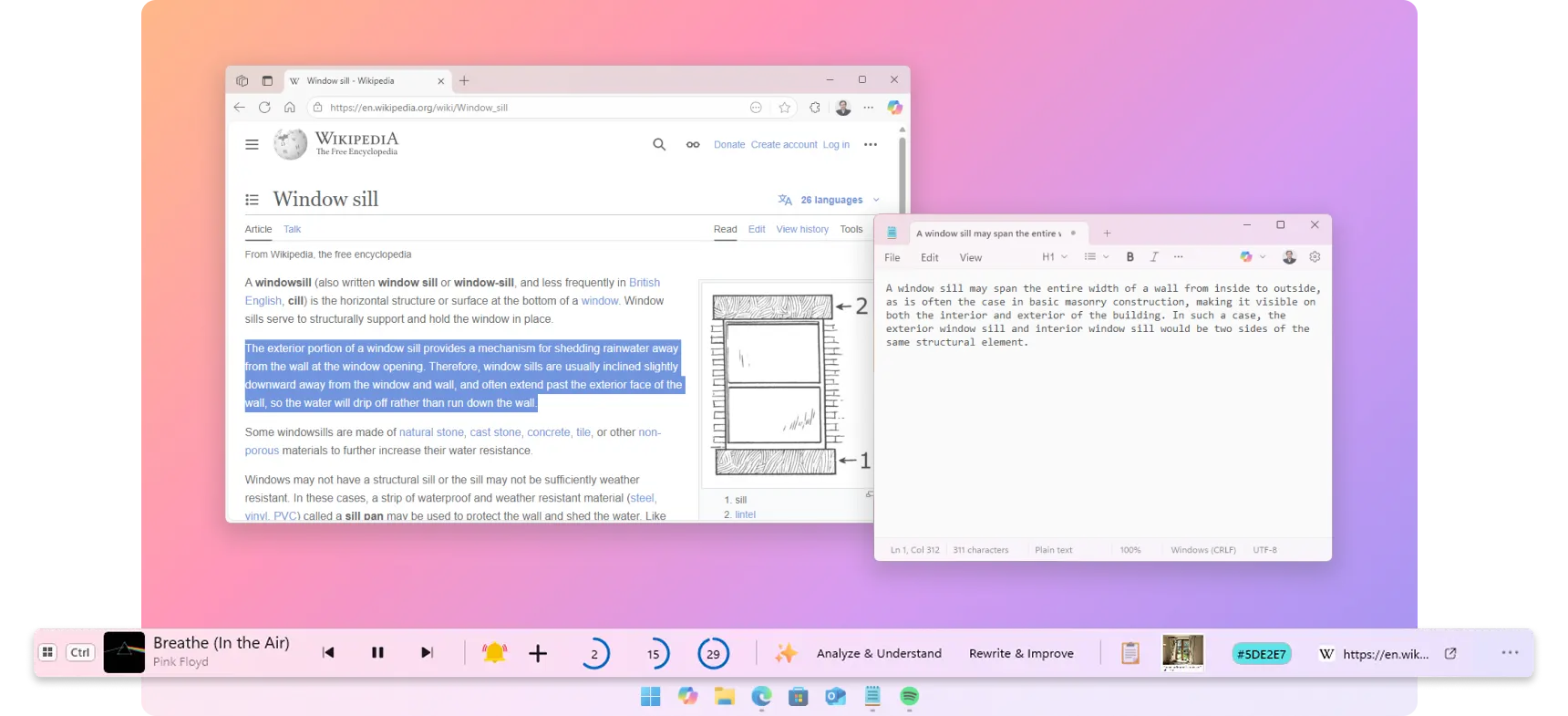
The AI-powered command bar that puts clipboard, media, meetings, and more at your fingertips.
As Featured On

A few testimonies extracted from Microsoft Store and YouTube.
I really needed something like this 🙏🙏
This is definitely a very good app for what it is! Would recommend to anyone who wants to customise Windows!
Several useful tools just 1 click away, it has become an essential app in my workflow!
This cool little bar at the bottom of my screen, made me feel like I have got some super controls over my computer. I appreciate all the combined efforts to make that function in a classy way. I really am obsessed with the audio controller, the clipboard text editing AI links and the mini quick remainder option. It makes a lot of tasks so easy and simple, it reduces your taps per action. You could do a real lot of things and guess there are more upcoming. with all these features it still doesn't feel out of box, still vibes in with my windows and blends in seamlessly with all my apps improving the looks.
As a power user I love the way this has improved my workflow!
Using it in Notion is be a huge time-saver!
I know this app only came out recently (and is still in preview), so i can't give it a bad review for the lack of features, but there are so many features it could have that would be sooo useful - like showing the date/time, pinning apps/files, showing notifications - the possibilities are endless for a taskbar on top of a taskbar lol
Very useful even though I don't use the AI features
Swiss Army knife of utility bars, simple and efficient to what it proposes and with a good possibility of customization. Very complete free version.
very nice and make our life easy as I don't need to go to the player to control the audio
I'm loving it and it's not even the lifetime version.
The image tool and color picker are the ones I use the most.
Run the software via the terminal using the command: wine RouterScan.exe .
Like many penetration testing suites, Router Scan v2.60 is classified as a dual-use utility. Depending on who is deploying the tool, its impact changes dramatically: The Ethical Use Case
Once a port responds, Router Scan analyzes the HTTP server headers and HTML structures to identify the manufacturer (e.g., TP-Link, D-Link, ASUS, NETGEAR) and the specific model or firmware version. 3. Credential and Data Extraction The software attempts two recovery methods:
Found: /cgi-bin/admin.cgi (returns 403), /debug (returns 200). router scan v2 60 thmyl
Within minutes, if the target router uses a default password or has an unpatched vulnerability, the scan will complete successfully. The results populate a table in the main interface. The attacker can now see the router's admin credentials, the Wi-Fi password, and more.
: Identifies HTTP proxy servers and logs their real WAN IP addresses.
Router Scan v2.60 remains a powerful, lightweight asset in a network defender's toolkit, compressing complex vulnerability scanning and credential auditing into a highly responsive, portable interface. By routinely conducting internal audits with this utility, organizations can catch weak configurations and unpatched firmware before external threats exploit them. Run the software via the terminal using the
The tool functions by scanning broad blocks of IP addresses, identifying alive hosts, and determining the exact make and model of the routing device. Once identified, it attempts to extract useful information from the router—such as the wireless network name (SSID), security keys, and firmware versions—or tests the device for default, weak, or misconfigured credentials. Core Features of Router Scan v2.60
: Regularly check for and install official vendor firmware upgrades to patch authentication bypass flaws.
: Checking for outdated firmware or specific security flaws that could lead to unauthorized access. Technical Operations and Detection The results populate a table in the main interface
Many routers ship with admin/admin or admin/password . A "Proper Report" highlights these as high-risk vulnerabilities that must be changed immediately. To help you refine this report, could you clarify:
: Attempting to bypass or guess administrative login credentials to access the router's web interface .
The v2.60 release added significant updates to the platform's wireless capabilities. Earlier versions focused primarily on scanning wired IP addresses, but version 2.60 introduced direct over-the-air auditing features.
: Because it is often distributed via unofficial forums and YouTube links, many versions of "Router Scan v2.60" found online are bundled with malware or backdoors , turning the scanner into the scanned. Key Capabilities
Router Scan v2.60: The Ultimate Guide to Network Auditing and Security Testing
Fix typos, translate, rewrite, or change tone in any app. No copy-pasting into a separate tool.
Select text in any app, whether it's your email, a document, or a chat message, and let AI improve it on the spot.
Select text in any app and translate it into 35+ languages. No switching to Google Translate, no new tabs. The result appears right where you're working.
Great for non-native speakers, remote teams, and multilingual workflows.
Rewrite any text to match the tone you need. Polishing a work email? Making a social post pop? Softening a blunt message? Done.
Typos and awkward phrasing slip in when you're typing fast, but they don't have to reach "Send." WindowSill reviews your text and fixes grammar and spelling while understanding context, so corrections actually make sense.
Useful for anyone who writes frequently, from students to professionals.
Build reusable prompts that capture your style: social posts, key-point extraction from reports, code formatting, whatever you repeat often. Save once, reuse forever.
Use cloud providers like OpenAI or Anthropic for maximum power, or run a local model on your machine for complete privacy. You decide what leaves your computer.
WindowSill isn't locked to one app. Select text or trigger actions anywhere on your system and get results on the spot.

Figma
Design

Stack Exchange
Social Media

Amazon
Shopping

Notion
Writing

Communication

Google Docs
Writing

Stack Overflow
Social Media

Visual Studio
Development
Google Sheets
Spreadsheets

YouTube
Media Player

Teams
Communication

Slack
Communication

Notepad++
Development

Spotify
Media Player

Word
Writing

Vivaldi
Browser

Social Media
OneNote
Writing

Opera
Browser

GitHub
Development

Social Media

Excel
Spreadsheets

WordPress
Writing

Chrome
Browser

PowerPoint
Writing

Outlook
Communication

Social Media

Discord
Communication

Edge
Browser

Gmail
Communication
Wondering how WindowSill stacks up against other tools? We put together honest, side-by-side comparisons.
One bar. Every shortcut you wish Windows had. Free to download.
Available for Windows 10 and 11.

Rejoining the server…
Retrying in s…
Connection lost.
Session paused.
Resume failed.